
Propeller and wing calculation software in 3D: boats, aircraft, wind turbines, tidal turbines, hydrofoils
Heliciel is a software for the calculation and design of propellers and wings in 3D. It calculates the thrust, torque, power and efficiency of a propeller, draws the optimal twist of its blades by the blade element method (BEM, Blade Element Momentum), then exports the 3D geometry for CAD (computer-aided design) and manufacturing. It handles boat, aircraft and drone propellers, wind and tidal turbines, fans and axial pumps, wings and hydrofoils. A PRO extension calculates the same project by CFD (Computational Fluid Dynamics), and an MCP (Model Context Protocol) connector makes it available to an AI assistant.
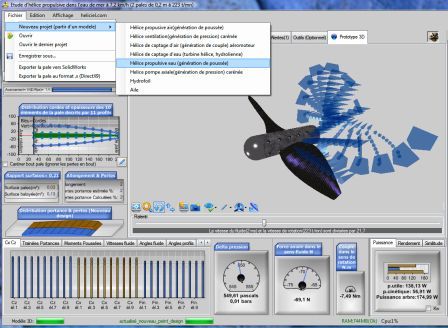
The Heliciel main window: the « New project » menu offers the propeller types (propulsive in air or water, ventilation, air or water capture, axial pump) followed by the hydrofoil and the wing, with the 3D view of the prototype behind the menu.
In this page:
- Quick description of the propeller and wing calculation and design software
- Calculating all types of propellers and wings: boat, aircraft, wind turbine, fan, hydrofoil
- The two difficulties of propeller calculation, and how Heliciel handles them
- Designing a propeller or wing in three phases
- Exporting the 3D blade model for CAD and manufacturing
- Going further: reverse engineering, optimization, structure, drones and turbines
- Checking a calculation: published validations and the PRO CFD extension
- Driving Heliciel with an AI assistant: the MCP connector
- Downloading Heliciel: licence and requirements
1 : Quick description of the propeller and wing calculation and design software
The calculation of a propeller consists of determining the torque and thrust performance of the propeller, but also the dimensions and shape to give the blades to obtain optimum efficiency. Heliciel is a software that helps with this calculation, intended for technicians, engineers, students and amateur designers who want to calculate and build an optimized propeller for a precise specification, on their own.
Heliciel is also an introductory software for the study and construction of propellers and wings. It allows a self-taught approach to discovering, then deepening, the design and calculation of propellers and wings. It is intended for:
- designers,
- technicians in charge of projects that include a propeller or a wing,
- students,
- self-builders.
Heliciel suits mechanical design offices and does not require in-depth knowledge of fluid mechanics calculation. It combines a database of profiles and a performance calculator in an ergonomic 3D interface. It thus brings together all the elements needed for the self-taught design of propellers and wings.
The performance can also be calculated for an existing propeller already fitted, whose dimensions and pitch (the pitch angle of the profiles) are measured, to check whether it suits the operating conditions. This is the reverse engineering of an existing propeller.
Heliciel takes a prototype design approach. The propeller tables you can find sometimes limit the choices, and force a compromise that does not give the project its optimum efficiency. The propeller must match the project without constraining it: you enter the operating parameters you know, and you test the different propeller geometries or wings that fit best in the environment of your project.
2 : Calculating all types of propellers and wings: boat, aircraft, wind turbine, fan, hydrofoil
With Heliciel, the calculation of propellers (wind turbines, tidal turbines, boats, aircraft, fans, axial pumps...) is available to technicians and designers who want to create a propeller suited to their project. Heliciel allows the design and performance calculation of all types of propellers:
- calculation of energy-capture propellers in a fluid stream (wind turbine calculation, tidal turbine calculation);
- calculation of propulsion or pressure-raising propellers (boat propeller calculation, aircraft propeller calculation, axial pump calculation, turbojet, fan and ventilation equipment calculation);
- Heliciel also lets you study and calculate wings or foils moving in a fluid (glider wing, boat sail, hydrofoil, rudders, daggerboards, helm...).
The page on types of propellers and wings that can be modelled describes the four types of studies and their goals. For wind turbines, tidal turbines and axial turbines, a dedicated page presents the software for wind turbine, tidal turbine and turbine calculation. A gallery of models in 3D helps you choose the starting point of each project.
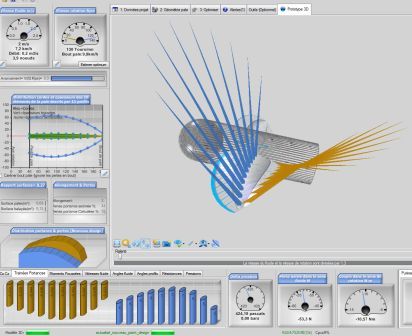
The 3D view of a propeller, with the lift and drag forces of each blade element drawn as blue lines.
3 : The two difficulties of propeller calculation, and how Heliciel handles them
The difficulties met in the design and performance calculation of propellers and wings are mainly of two kinds:
- collecting the profile data for the blades of the propeller or wings (lift and drag coefficients at the angles of attack and speeds of use), and integrating them into the performance calculation;
- determining the induced velocities, which deflect the fluid stream and influence the angle of attack and the performance of propellers or wings.
Designers and technicians who want to include propellers or wings in their projects rarely have time to go deep into the theoretical calculations, and are not always specialised in fluid mechanics. Heliciel deals with both difficulties. It brings together the profile data and a performance calculation method in a shape-control interface, and it lets you obtain a propeller ready to be built very quickly. The polars of profiles can also be calculated in the software, with the Xfoil solver: see the numerical wind tunnel.
4 : Designing a propeller or wing in three phases
Tabs and a progress tree highlight the organization of the design phases of propellers or wings proposed by Heliciel, and also let you move freely between the different phases of construction. The three phases are: entering the project data (fluid, objective, operating point), describing the blade geometry (dimensions and profile law), then optimizing (rotation speed, number of blades).
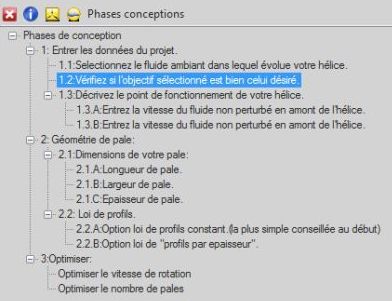
The progress tree of the design phases: 1 enter the project data, 2 blade geometry, 3 optimize.
You impose the fluid, the objective, the operating point, the blade dimensions and the profile law; Heliciel calculates the induced velocities, the optimum twist and the performance. When the propeller or wing suits the goal, a drawing of the blade or wing can be edited. The image of each profile describing your blade or wing, with its pitch angle, is provided, and you can also collect the coordinates of each profile, to scale or normalized, as tables.
5 : Exporting the 3D blade model for CAD and manufacturing
Heliciel builds the blade or wing in 3D and exports the 3D model of the blade or wing. The choice of format depends on the use: STL or OBJ for 3D printing, STEP for parametric CAD, IGS for smoothed surfaces, GLB to show the propeller in any 3D viewer, DirectX (.x) for games, simulators and animation. The page on 3D propeller exports compares these formats. Some CNC machining centres use these files directly, and if you have CAD software, you can export the blade or wing to it.
For a large blade, a test blade or a basin model, the blade kit made of plates to assemble breaks the calculated blade down into cuttable parts and outputs the sheet in DXF format. Smoothing functions also improve the surface finish: see the rounded blade tip, root fillet and smoothing.
6 : Going further: reverse engineering, optimization, structure, drones and turbines
The software does not stop at calculating a single propeller. Here are the most used functions, each described on its own page:
- Off-design performance and curves: the multiple analysis of operating points plots the performance curves; for a marine propeller, read Kt, Kq and J.
- Optimization: the speed and number of blades are searched together, and the genetic analysis explores speed, number of blades, radius and chords at once.
- Reference marine propeller: the Wageningen B series is built in, and Heliciel applies to the project the one that meets the specification.
- Tip losses and shroud: the winglet and the ducted propeller option, with the choice between free flow, ducted propeller and forced duct.
- Structure: the check of blade strength in bending and centrifugal tension, and the detection of cavitation.
- Drones and multirotors: the multirotor and VTOL project and the contra-rotating pair, depending on the configuration of the workstation.
- Hydraulic turbines and ships: the Hydro Turbine design tool (in beta) sizes the structure around the Kaplan propeller, and the study of ship waves and drag gives the resistance of a hull.
- Profiles: creating and correcting profiles, and the profile selection laws.
For a more detailed description of the functions of Heliciel, see Heliciel functions. For tutorials and videos, see the Heliciel tutorials.
7 : Checking a calculation: published validations and the PRO CFD extension
A propeller calculation software is only useful if you know what to compare its results with. We publish the deviations as they are. The validation on the Wageningen B series compares Heliciel with published polynomials, and the validation against wind tunnel measurements covers two aircraft propellers from the University of Illinois.
To go further, the Heliciel PRO CFD/BEM extension adds to the designer a CFD test bench based on OpenFOAM: the model of the current project is injected into it with one click, and the domain, the rotating zone, the mesh and the solver are deduced from the project. CFD gives what BEM does not produce, such as the pressure map on the blades. The following pages show the approach:
- PRO CFD tutorials and films;
- CFD simulation of a propeller, first complete calculation;
- BEM and CFD on the same propeller, to read the gap between the two;
- calculated cases: boat propeller, aircraft propeller, drone propeller, wind turbine, ducted fan and wing and hydrofoil.
8 : Driving Heliciel with an AI assistant: the MCP connector
The Heliciel MCP connector links an AI assistant (Claude, ChatGPT, Le Chat or any compatible client) to the software. The assistant no longer guesses a diameter or an efficiency: it drives a real instance of Heliciel, which runs a BEM calculation and reads the design alerts. Every figure returned comes from a calculation by the software, not from an estimate by the language model, and a missing parameter is asked for rather than assumed. See the page Heliciel MCP: real propellers, designed by your AI assistant.
- drone propeller with an AI, aircraft propeller and wind turbine power;
- an AI with or without Heliciel MCP: reliability, energy and confidentiality.
9 : Downloading Heliciel: licence and requirements
 Download and purchase Heliciel
- Requirements: 200 MB of free memory, display of 1024 × 768 minimum, 64-bit Windows. Heliciel is only available for download from this site.
- Licence: it allows you to install and use Heliciel on the number of computers chosen at purchase. It is unlimited in time, and updates are free.
- Reinstallation: after a hard drive crash, a destruction or a change of computer, a simple download through the customer service lets you reinstall Heliciel. A maximum of two free installations is possible because of destruction or change. See the terms of sale.
To go further, we can follow the boat propeller design tutorial, or browse the discovery of the interface before opening a first project.
 Global site map
 Mecaflux
 Tutorials Mecaflux Pro3D
 Tutorials Heliciel
 Tutorials Heliciel PRO CFD
 Mecaflux Store
 Compare software functions
 Quotes, Orders, Payment Methods
 project technical studies